DIRECTORY / software-development
Software Development_
Notes from the workbench. Pick a file and dive in.
Esc
7 entries│subscribe --rss ↗
00software-development/enable-touch-id-for-sudo-on-mac-os.md1.2 KiB
Enable Touch ID for sudo on macOS
$ head -n 12 enable-touch-id-for-sudo-on-mac-os.md
* System: macOS Sequoia 15.5 ## Enable Touch ID for sudo Since [macOS Sonoma 14.0](https://support.apple.com/en-us/109030), it is allowedto use Touch ID for sudo with a configuration that persists across softwareupdates using `/etc/pam.d/sudo_local`. ### Update `/etc/pam.d/sudo_local` ```bash# Enable Touch ID for sudo.01software-development/develop-cross-platform-desktop-app-with-blazor-and-electron-net.md1.9 KiB
Develop Cross Platform Desktop App with Blazor and Electron.NET
$ head -n 12 develop-cross-platform-desktop-app-with-blazor-and-electron-net.md
* System: macOS Big Sur 11.6* Dotnet: 5 ## Install Electron.NET CLI Tool First, we need to install the [Electron.NET](https://github.com/ElectronNET/Electron.NET) tool. ```bashdotnet tool install ElectronNET.CLI -g``` ## Initialize a Blazor Server Project02software-development/deploy-your-react-app-to-github-pages.md1.8 KiB
Deploy Your React App as Github Pages
$ head -n 12 deploy-your-react-app-to-github-pages.md
[Github Pages](https://pages.github.com/) is a convenient way to publish a website for your project hosted on [Github](https://github.com/). In this article I'll introduce how to set up the Continuous Deployment Workflow based on [Github Actions](https://github.com/features/actions) to build and deploy your React App to [Github Pages](https://pages.github.com/). ## Develop Your React App. First, we use [create-react-app](https://github.com/facebook/create-react-app) tool to initialize a new project. ```bashnpx create-react-app example-app``` ## Setup Github Workflow. 03software-development/deploy-reproducible-infrastructure-on-aws-with-terraform.md14.7 KiB
Deploy Reproducible Infrastructure on AWS with Terraform
$ head -n 12 deploy-reproducible-infrastructure-on-aws-with-terraform.md
[Terraform](https://www.terraform.io/) is an open-source infrastructure as code software tool created by HashiCorp. In this article, I'm going to introduce how to deploy a scalable .NET Web Api Service on AWS with Terraform. ## Prerequisites. * An [AWS](https://aws.amazon.com/) account.* The [AWS CLI](https://aws.amazon.com/cli/) installed.* Your AWS credentials configured locally.* The [Terraform CLI](https://www.terraform.io/) installed. ## Overview. Basically, I want to deploy a .NET Web Api Service called [comments-api](https://github.com/aguang-xyz/comments-api) on AWS. It will provide REST APIs to manage the comments of [my blog](https://aguang.xyz/). It has only one dependency: a MySQL database server. To make it scalable to face high concurrency scenario, we plan to have an [Elastic Load Balancer \(ELB\)](https://aws.amazon.com/elasticloadbalancing) to load balance HTTP requests to multiple backend [Elastic Container Services (ECS)](https://aws.amazon.com/ecs/). And we will host a [Relational Database Service (RDS)](https://aws.amazon.com/rds/) as the production MySQL database server.04software-development/publish-your-dotnet-library-with-nuget.md7.8 KiB
Publish Your .NET Library with NuGet
$ head -n 12 publish-your-dotnet-library-with-nuget.md
## What is NuGet? [NuGet](https://www.nuget.org/) is a package manager for .NET platform. By using NuGet tools, we can easilly install and publish libraries. In this article, I'm going to talk about how to initialize a .NET class library with Test Driven Development (TDD) and how to set up [Github Actions](https://docs.github.com/en/actions) to achieve Continuous Integration (CI) & Continuous Deployment (CD). ## Prerequisites. 1. First, we should make sure that [.NET Core SDK](https://dotnet.microsoft.com/download/) has been sucessfully installed on our machine.2. And we need to register a free account on [nuget.org](https://www.nuget.org/). ## Initialize .NET class library. Now, we use dotnet CLI to **create a class library project**.05software-development/file-associations-in-electron-apps.md4.7 KiB
File Associations in Electron Apps
$ head -n 12 file-associations-in-electron-apps.md
[Electron](https://www.electronjs.org/) is widely used framework by which wecan build cross-platform apps with Javascript, HTML and css. In this article,I want to introduce a simple way to implement file associations. ## Initialize a new Electron Application. [Electron-builder](https://github.com/electron-userland/electron-builder) is acomplete solution to package and build a ready-for-distribution Electron app.A recommended way to create a new Electron application is to clone the templaterepository called [electron-webpack-quick-start](https://github.com/electron-userland/electron-webpack-quick-start). ```bash06software-development/auto-captioning-in-python.md8.3 KiB
Automatic Captioning in Python
$ head -n 12 auto-captioning-in-python.md
* System: Ubuntu 18.04* Python: 3.6 There are many cloud-based speech recognization services available(etc. [Google Cloud](https://cloud.google.com/speech-to-text/), [IBM Watson](https://www.ibm.com/cloud/watson-speech-to-text), [Microsoft Azure](https://azure.microsoft.com/en-us/services/cognitive-services/speech-to-text/), [Wit.ai](https://wit.ai/)). But in this article, I'm gonna introduce the way how to achieve auto-captioning fully offline step by step. 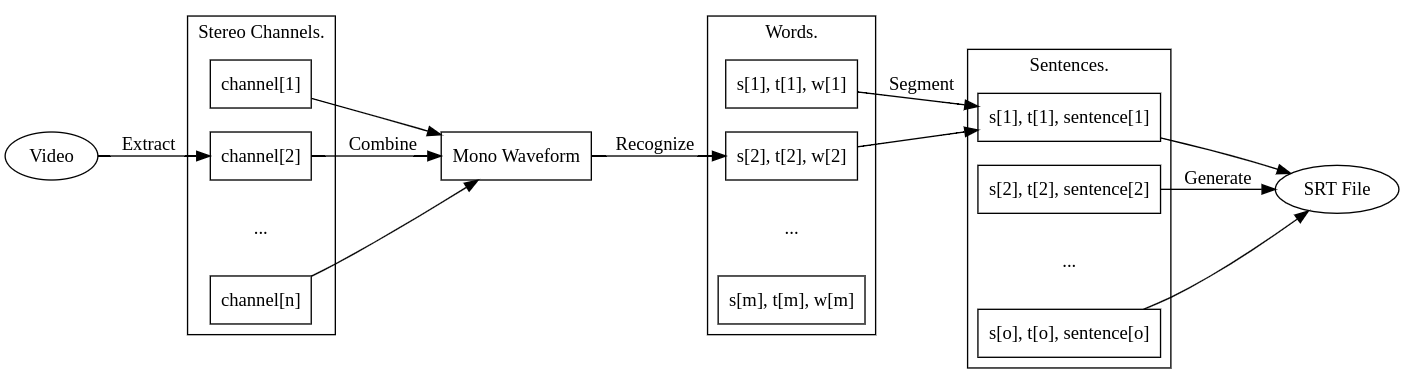 Briefly, this program contains several parts: * Extracting the audio from the input video.* Converting from stereo waveforms to single mono waveform.No matches. Try a shorter filename.
end of directory listing. ▉